
🔵 OpenAI Launches dots: Always-On Agents Powered by GPT-6 Astra
✨ The agent no longer waits for your next prompt. It keeps working after the conversation ends.
🌐 Introduction
OpenAI today launched dots at DevDay 2026 in San Francisco. OpenAI writes the name in lowercase. A dot is a personal agent that lives inside ChatGPT. It runs on GPT-6 Astra, gets its own cloud computer, and can connect to more than 4,000 apps through OpenAI's plugin ecosystem.
The pitch is persistence. You don't open a chat, get an answer and close the tab. You give a dot a goal, and it keeps working on that goal in the background, sending updates or asking questions when it needs you.
💡 "remarkably capable, always-on agents built to handle everything" — OpenAI
The launch also lands in a crowded month. TechCrunch framed dots against Meta's Muse agent, and the release came a day after the Wall Street Journal reported that OpenAI had scrapped its planned GPT-6.1 Astra release over safety concerns. More on that in our companion post on GPT-6.1 Sol.
🤖 What Is a dot?
OpenAI describes dots as agents that work toward your goals 24/7, learn from feedback, and get better the more you work with them. Here is what each dot comes with, according to OpenAI and early coverage:
| Component | What OpenAI Says | Why It Matters |
|---|---|---|
| 🧠 Model | Powered by GPT-6 Astra | OpenAI's most capable model drives every dot |
| 💻 Cloud computer | Each dot runs on its own cloud computer with its own browser | It can browse and operate software without your laptop being on |
| 🔌 Plugins | Connects to more than 4,000 apps | Reaches into the tools your team already uses |
| 🗂️ Memory | Receives memories and recent context from ChatGPT, and forms its own from connected apps | Carries context across channels and over time |
| 💬 Channels | ChatGPT on desktop, web and mobile, plus Slack and Teams | You message it where you already work |
| 🔍 Background research | Restricted to read-only tools | It can look things up proactively without changing anything |
TechCrunch reports that users can name their dot and that OpenAI envisions specialist dots with their own identities, credentials and tools, and eventually teams of dots working together. With permission, a dot can also connect to other devices or work on your laptop.
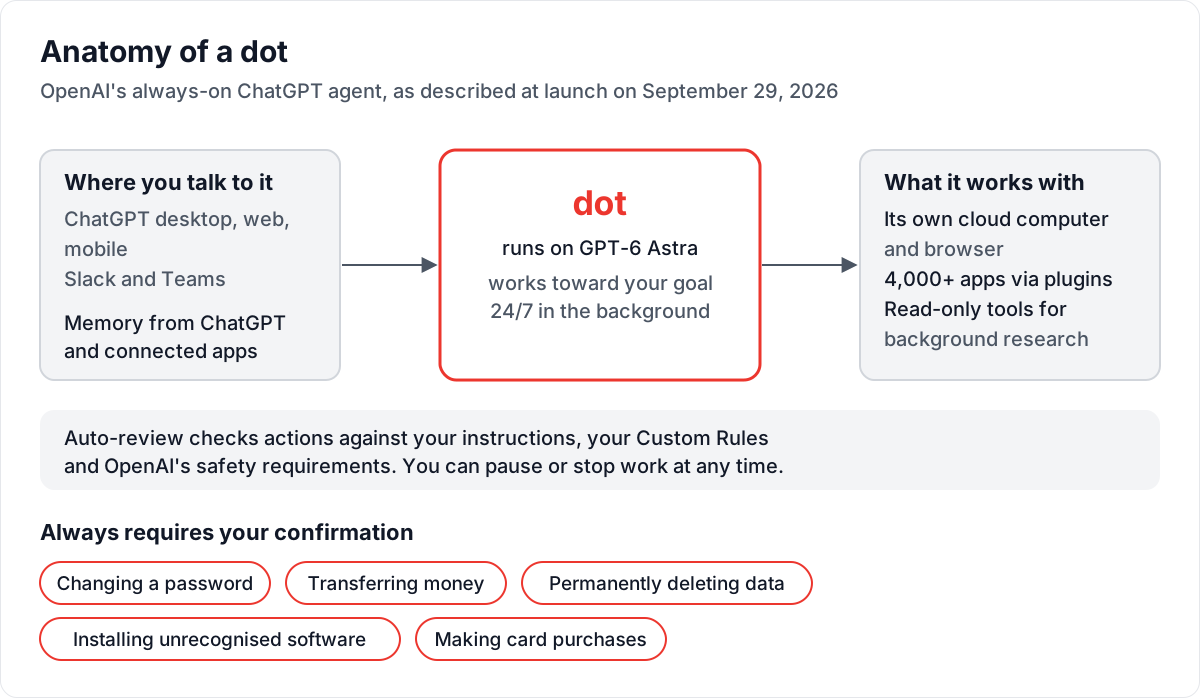
What a dot connects to, and the guardrails around it. Diagram: Big Matrix Solutions, based on OpenAI and Unite.AI.
🎬 Watch it work: OpenAI's launch post includes short videos of dots working on their own, working where you work, and keeping you in control. Watch them on OpenAI's site.
🧪 OpenAI's Own Examples
According to TechCrunch, OpenAI's examples include a software developer whose dot monitors customer feedback and implements fixes, and a scientist whose dot reruns analysis on experimental data. Both examples describe ongoing work, not one-off tasks.
💳 Availability and Pricing
OpenAI is rolling dots out now, but not to everyone:
| Plan | Access at Launch |
|---|---|
| ChatGPT Pro | Rolling out, excluding the European Economic Area, Switzerland and the UK |
| ChatGPT Business Premium | Rolling out in supported regions |
| ChatGPT Enterprise | Beta, off by default until an admin enables it |
Key Launch Details:
- ✅ The first dot is included in Pro and Business Premium at no extra cost
- ✅ OpenAI says users will later be able to add more dots, with no pricing announced yet
- ✅ Plans include an allowance for deeper work, with extended limits for the first month after launch
- ✅ Conversations with your dot don't count toward ChatGPT usage limits, though Codex and ChatGPT Work tasks it starts do
- ✅ Setup starts on the desktop app or desktop browser, with mobile access after that
- ✅ Texting is a limited beta through a third-party provider, for US Pro users only
DataCamp's explainer also notes what dots can't do yet. They can't place calls to you, and they don't get a standalone email address.
🛡️ Safety Controls
An agent with its own computer, saved passwords and access to thousands of apps needs guardrails. OpenAI describes several layers, according to Unite.AI and TestingCatalog's summaries of the launch and its companion safety post:
Built-in Guardrails:
- 🔒 The dot's cloud computer stays separate from your devices unless you grant access
- 🔑 Saved passwords can be used on supported sites without being exposed to the model
- 🧾 An auto-review system checks actions against your instructions, your Custom Rules and OpenAI's safety requirements
- ⏸️ You can manage permissions, set Custom Rules, and pause or stop work at any time
Some actions always require your confirmation, according to Unite.AI:
| Always Requires Confirmation |
|---|
| 🔐 Changing a password |
| 💸 Transferring money |
| 🗑️ Permanently deleting data |
| 📦 Installing software the system doesn't recognise |
| 💳 Making card purchases |
TechCrunch also reports that OpenAI is working with Microsoft to integrate dots with Agent 365 security controls, which matters for Business and Enterprise rollouts.
💼 What It Means for Teams
For a software consultancy, dots change the question from "which chatbot should we use?" to "which ongoing jobs should an agent own?" Here is how we would approach it:
1. 🎯 Start With Read-Only, Recurring Work
The safest first jobs fit what dots already do by default: background research with read-only tools. Good candidates include:
- ✅ Monitoring release notes, dependency advisories and competitor changelogs
- ✅ Summarising customer feedback from Slack or Teams channels into weekly themes
- ✅ Tracking open pull requests or tickets and flagging stale ones
2. 🧩 Write Custom Rules Before You Grant Access
Treat a dot like a new contractor. Decide up front which apps it can touch, what it may change, and what always comes back to a human. Then encode that in Custom Rules. The built-in confirmations cover passwords, money and deletion, but your own red lines, such as pushing code or emailing clients, are yours to define.
3. 🌍 Check Your Region and Plan First
If your team or client is in the EEA, Switzerland or the UK, Pro access isn't available at launch. Business Premium and the Enterprise beta follow different rules. Confirm eligibility before you build a workflow around dots.
4. 💰 Budget for After the First Month
Limits are extended for the first month after launch, and pricing for extra dots hasn't been published. Run your pilot now, but measure how much work the dot actually does so you can forecast costs once normal limits apply.
| Pilot Step | What to Measure |
|---|---|
| 📋 Define one goal | Is the task clearly ongoing, not one-off? |
| 🔌 Connect minimal apps | How many plugins does it really need? |
| 🧾 Review its actions weekly | How often did it ask, and how often was it right? |
| 📈 Track usage | What will this cost when normal limits return? |
✨ Conclusion
With dots, OpenAI makes its clearest move yet from chat assistant to persistent agent. Each one runs on GPT-6 Astra, has its own cloud computer, and connects to more than 4,000 apps. The first one is included in Pro and Business Premium.
Region limits, an off-by-default Enterprise beta and unpublished pricing for extra dots all point the same way. This is an early rollout, not a finished platform. For teams, the right move is a scoped pilot with tight Custom Rules and read-only defaults. You'll learn what an always-on agent can safely own before clients start asking for one.
💭 The question is shifting from "What can I ask the AI?" to "What should my AI be working on while I'm not looking?"
Tags: #AgenticAI #AIAgents #OpenAI #ChatGPT #dots #GPT6Astra #AISecurity #BigMatrixSolutions
Sources:
- Introducing dots — OpenAI
- OpenAI launches Dots, its bubbly agentic avatar — TechCrunch
- OpenAI Rolls Out Dots Agents Powered by GPT-6 Astra in ChatGPT — Unite.AI
- OpenAI launches Dots agents powered by GPT-6 Astra — TestingCatalog
- OpenAI Dots: Always-On Agents in ChatGPT, Explained — DataCamp
- OpenAI cancels release of AI model GPT-6.1 Astra, citing safety concerns — Al Jazeera
Media credits: